A couple of things.
- Is your setup Single user or Mult-user?Single User would not prompt for a User ID, since the Mail is stored in C:\PMAIL\MAILMulti-user has sub directories for each user.
In my test mult-user setup C:\PMAIL\MAIL has
<DIR> ADMIN
69 PMAIL.USR
Only 1 user setup.
PMAIL.USR has
type PMAIL.USR
; PMAIL.USR Pegasus Mail user database.
A;Admin;Mail Administrator
In my primary email it is singe user.
Its PMAIL.USR has
; PMAIL.USR Pegasus Mail user database.
A;Admin;Mail Administrator
The C:\PMAIL\MAIL has over 340 files, since it has my users mail folder in it.
Had an Admin subdirectory, but it just has the standard dummy files.
BASIC.PNC
BLACK.PML
CACHE.PM
COPYSELF.PMI
COPYSELF.PMM
DESKTOP.PM0
FOLSTATE.PM
HIERARCH.PM
JUNK.PMI
JUNK.PMM
MAIN.PMI
MAIN.PMM
NEWCACHE.PM
'PERSONAL.PM!'
PERSONAL.PMR
PMAIL.INI
SPAMBUST.DAT
STATE.PMJ
VIEWER.PM
WHITE.PML
WORDS4.DB3
So determining if you have a single or multi-user setup is first step.
2nd step. I your have your system setup as mult-user, but are only using a single user.
To avoid the prompting of user name. Add an -I Admin to command line, and that will skip prompts.
Or use the C:\PMAIL\Programs\WSSETUP.EXE
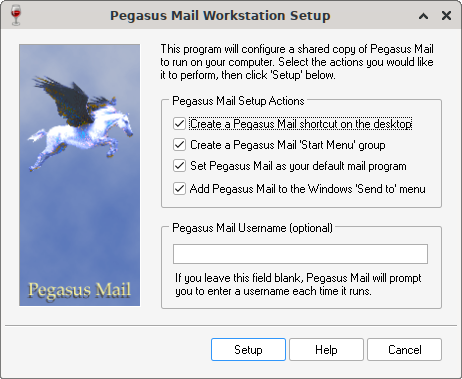
Would enter Admin or whaterver user id you use.
Believe it creates a registry entry.
Could also look at what your C:\PMAIL\Programs\PMAIL.CFG has
type C:\PMAIL\Programs\PMAIL.CFG
With mine I just got with my mult-user setup?
type PMAIL.CFG
C:\PMAIL\MAIL\~N??????????????????????????????????????????????????C:\PMAIL\MAIL\~N???????????????????????????????????????????????????????????????????????????????????????????????????????????
?????????????????????????????????????????????????????????????????????????????????????????????????????????????????????????????????????????????????????????????????????????????????????????????
?????????????????????????????????????????????????????????????????????????????????????????????????????????????????????????????????????????????????????????????????????????????????????????????
?????????????????????????????????????????????????????????????????????????????????????????????????????????????????????????????????????????????????????????????????????????????????????????????
?????????????????????????????????????????????????????????????????????????????????????????????????????????????????????????????????????????????????????????????????????????????????????????????
???????????????????????????????????????????????????????????????????????????????
First time I've seen that. Usually the nulls are not shown at all, but here it shows as ?
Importand the is the ~N that shows it wants to user a user name, so prompts for one.
On my single user setup. Get this for PMAIL.CFG
C:\PMAIL\MAILC:\PMAIL\MAIL (Nulls not displayed with linux cat command).
If your PMAIL.CFG doesn't match with the actual mail setup, user the PCONFIG32.EXE
to change it (with Pegasus not running).
Run it, and the on 2nd window enter C:\PMAIL\MAIL or C:\PMAIL\MAIL~N and save then try it.
Again. Do not use and editor to modify PMAIL.CFG it is not a text file, and only PCONFIG32.EXE should be used on it.
Also, best to copy everything in C:\PMAIL to and archive or a backup folder, so it can be restored if something goes wrong.
Hope that helps.
A couple of things.
1. Is your setup Single user or Mult-user?
Single User would not prompt for a User ID, since the Mail is stored in C:\PMAIL\MAIL
Multi-user has sub directories for each user.
In my test mult-user setup C:\PMAIL\MAIL has
<DIR> ADMIN
69 PMAIL.USR
Only 1 user setup.
PMAIL.USR has
type PMAIL.USR
; PMAIL.USR Pegasus Mail user database.
A;Admin;Mail Administrator
In my primary email it is singe user.
Its PMAIL.USR has
; PMAIL.USR Pegasus Mail user database.
A;Admin;Mail Administrator
The C:\PMAIL\MAIL has over 340 files, since it has my users mail folder in it.
Had an Admin subdirectory, but it just has the standard dummy files.
BASIC.PNC
BLACK.PML
CACHE.PM
COPYSELF.PMI
COPYSELF.PMM
DESKTOP.PM0
FOLSTATE.PM
HIERARCH.PM
JUNK.PMI
JUNK.PMM
MAIN.PMI
MAIN.PMM
NEWCACHE.PM
'PERSONAL.PM!'
PERSONAL.PMR
PMAIL.INI
SPAMBUST.DAT
STATE.PMJ
VIEWER.PM
WHITE.PML
WORDS4.DB3
So determining if you have a single or multi-user setup is first step.
2nd step. I your have your system setup as mult-user, but are only using a single user.
To avoid the prompting of user name. Add an -I Admin to command line, and that will skip prompts.
Or use the C:\PMAIL\Programs\WSSETUP.EXE
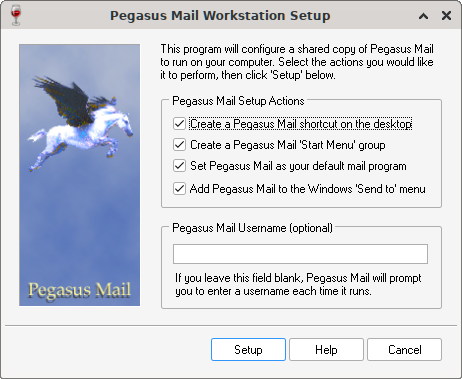
Would enter Admin or whaterver user id you use.
Believe it creates a registry entry.
Could also look at what your C:\PMAIL\Programs\PMAIL.CFG has
type C:\PMAIL\Programs\PMAIL.CFG
With mine I just got with my mult-user setup?
````
type PMAIL.CFG
C:\PMAIL\MAIL\~N??????????????????????????????????????????????????C:\PMAIL\MAIL\~N???????????????????????????????????????????????????????????????????????????????????????????????????????????
?????????????????????????????????????????????????????????????????????????????????????????????????????????????????????????????????????????????????????????????????????????????????????????????
?????????????????????????????????????????????????????????????????????????????????????????????????????????????????????????????????????????????????????????????????????????????????????????????
?????????????????????????????????????????????????????????????????????????????????????????????????????????????????????????????????????????????????????????????????????????????????????????????
?????????????????????????????????????????????????????????????????????????????????????????????????????????????????????????????????????????????????????????????????????????????????????????????
???????????????????????????????????????????????????????????????????????????????
````
First time I've seen that. Usually the nulls are not shown at all, but here it shows as ?
Importand the is the ~N that shows it wants to user a user name, so prompts for one.
On my single user setup. Get this for PMAIL.CFG
C:\PMAIL\MAILC:\PMAIL\MAIL (Nulls not displayed with linux cat command).
If your PMAIL.CFG doesn't match with the actual mail setup, user the PCONFIG32.EXE
to change it (with Pegasus not running).
Run it, and the on 2nd window enter C:\PMAIL\MAIL or C:\PMAIL\MAIL\~N and save then try it.
Again. Do not use and editor to modify PMAIL.CFG it is not a text file, and only PCONFIG32.EXE should be used on it.
Also, best to copy everything in C:\PMAIL to and archive or a backup folder, so it can be restored if something goes wrong.
Hope that helps.


