Community Discussions and Support
Mail Filtering Rules

I'd like to set up a rule to move messages from Sender "A" that are older than One Week Old from my New Mail Folder to Deleted Messages, but all I seem to be able choose is send all of the messages from a particular sender to Deleted Messages when the New Mail Folder is either opened or closed.


Am I missing something obvious?


Thanks!!!


I'd like to set up a rule to move messages from Sender "A" that are older than One Week Old from my New Mail Folder to Deleted Messages, but all I seem to be able choose is send all of the messages from a particular sender to Deleted Messages when the New Mail Folder is either opened or closed. Am I missing something obvious? Thanks!!!

You are not missing anything obvious. You must first know that new mail filtering rules will not act on read messages so you likely won't be able to use new mail filtering. You can however attach a general rule set to the New Mail folder as a folder-open or folder-close filter set. Secondly, there is no way to create a single filter that will detect two conditions, in your case, the sender and the message age. You can accomplish this with two filter rules and "Logical AND".


  • Create a filter rule that detects Sender "A" and set its action to "Logical AND".
  • Create a subsequent filter that detects the message age and deletes it if over 7 days. Hint: I suggest first setting the action to a color change action for testing.

You are not missing anything obvious. You must first know that new mail filtering rules will not act on read messages so you likely won't be able to use new mail filtering. You can however attach a general rule set to the New Mail folder as a folder-open or folder-close filter set. Secondly, there is no way to create a single filter that will detect two conditions, in your case, the sender and the message age. You can accomplish this with two filter rules and "Logical AND". - Create a filter rule that detects Sender "A" and set its action to "Logical AND". - Create a subsequent filter that detects the message age and deletes it if over 7 days. Hint: I suggest first setting the action to a color change action for testing.

I was hoping it would be a bit simpler process, but this is worth a shot!


Thanks!!!!!!


I was hoping it would be a bit simpler process, but this is worth a shot! Thanks!!!!!!

Don't know if this might work? If rules only apply to only messages marked unread??


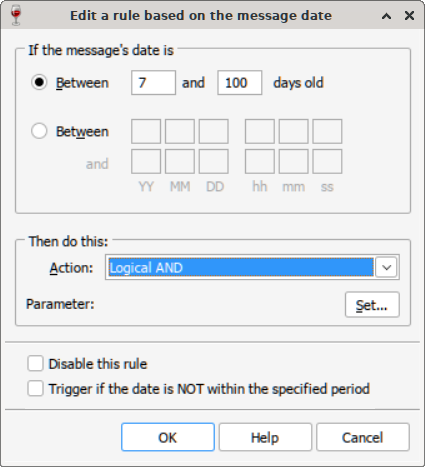
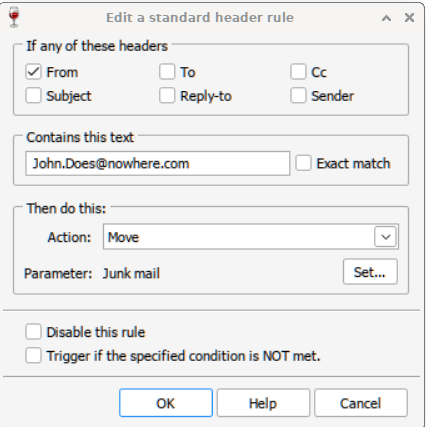
Lines added to WINRULES.PMC
If date between 7 and 100 LogicalAnd ""
If header "F" contains "John.Does@nowhere.com" Move "00C0FD35:667E:JUNK"


Did rule with messages between 7 and 200 days old?
69ef349ba1ca8
Then added rule to check for From field used dummy name here.
69ef35bb1650d


So, if it works. Messages older than 7 days (might want to use 8 instead of 7). and that have the users email in from field. I don't leave mesages in new mail folder (actually CNM files). Either move them to folders, or delete them in my class or go to Main folder by default.


Hope that helps.
Going to remove from my WINRULES.PMC


Don't know if this might work? If rules only apply to only messages marked unread?? Lines added to WINRULES.PMC If date between 7 and 100 LogicalAnd "" If header "F" contains "John.Does@nowhere.com" Move "00C0FD35:667E:JUNK" Did rule with messages between 7 and 200 days old? ![69ef349ba1ca8](serve/attachment&path=69ef349ba1ca8) Then added rule to check for From field used dummy name here. ![69ef35bb1650d](serve/attachment&path=69ef35bb1650d) So, if it works. Messages older than 7 days (might want to use 8 instead of 7). and that have the users email in from field. I don't leave mesages in new mail folder (actually CNM files). Either move them to folders, or delete them in my class or go to Main folder by default. Hope that helps. Going to remove from my WINRULES.PMC

mikes@guam.net

Very interesting! To edit WINRULES.PMC, I just open it and it should be obvious? (I've never tried something like that before)


Thanks for the suggestion and I'll have to give it a try when I get a chance.


Very interesting! To edit WINRULES.PMC, I just open it and it should be obvious? (I've never tried something like that before) Thanks for the suggestion and I'll have to give it a try when I get a chance.

To edit WINRULES.PMC, I just open it and it should be obvious? (I've never tried something like that before)


You can edit it with a text editor but I don't recommend it because you must get the syntax exactly right. Creating rules through the GUI handles that for you. I only look at the raw file when desperate to figure out if I have a logic issue. It provides a different view that can sometimes help spot an issue, or help reassure that one doesn't exist.


[quote="pid:58907, uid:4544"]To edit WINRULES.PMC, I just open it and it should be obvious? (I've never tried something like that before)[/quote] You can edit it with a text editor but I don't recommend it because you must get the syntax exactly right. Creating rules through the GUI handles that for you. I only look at the raw file when desperate to figure out if I have a logic issue. It provides a different view that can sometimes help spot an issue, or help reassure that one doesn't exist.

Also, the WINRULES.PMC file holds new mail on-open filter rules which I don't think will work for what you are trying to accomplish unless the new mail messages you want to filter are unread.


Also, the WINRULES.PMC file holds new mail on-open filter rules which I don't think will work for what you are trying to accomplish unless the new mail messages you want to filter are unread.

I know you guys are trying to help, but I'm confused. smile Although I've been a user and supporter for a VERY long time, I try not to go too far beyond the obvious options that are offered.


No matter which program I use to try to open WINRULES.PMC, all I get is text.


Where can I find the page that says "Edit a rule based on the message date" as suggested above?


I know you guys are trying to help, but I'm confused. :S Although I've been a user and supporter for a VERY long time, I try not to go too far beyond the obvious options that are offered. No matter which program I use to try to open WINRULES.PMC, all I get is text. Where can I find the page that says "Edit a rule based on the message date" as suggested above?

Tools / Mail Filter Rules / Edit new mail filter rules / before / Add Rule


69f1b51d8e339


Message Date.


Tools / Mail Filter Rules / Edit new mail filter rules / before / Add Rule ![69f1b51d8e339](serve/attachment&path=69f1b51d8e339) Message Date.

mikes@guam.net

live preview
enter atleast 10 characters
WARNING: You mentioned %MENTIONS%, but they cannot see this message and will not be notified
Saving...
Saved
With selected deselect posts show selected posts
All posts under this topic will be deleted ?
Pending draft ... Click to resume editing
Discard draft